Показаны сообщения с ярлыком Enlightenment-LiveCD. Показать все сообщения

вторник, 24 ноября 2009 г.

SOAD-Linux-3.3.1 is out

/*

Ladies and Gents,

the new SOAD-Linux based on openSUSE-11.2 is out:

Download page
List of installed packages
README
Version 3.3.1 download link

It's a hybrid "iso" image capable to run in VM (qemu, etc.), to be burned on CD/DVD or to be "dumped" to USB-sticks. We're providing the extended set of a drivers for devices/filesystems along with the extended set of WM's for your convenience. Please be aware that we can not assure the correct behavior of "Ecomorph" despite on installed NVIDIA driver (you need to build from official "NVIDIA*.run" sources to avoid "White screen" compiz bug for a modern NVIDIA GPU's). Also due to a "lzma+squashfs" compression method we can't provide the small "xdelta" patches yet.

You're always welcome to leave your comments here.

Have fun!

***********************************************

Дамы и Господа,

предлагаем Вашему вниманию новую версию SOAD-Linux, основанную на openSUSE-11.2:

Страница загрузки
Список предустановленных пакетов
README
Скачать образ

С удовольствием учтём Ваши пожелания при подготовке следующих релизов.

Удачи!

*/

суббота, 12 сентября 2009 г.

Version 3.2.1 is out.

/*

Ladies and Gents,
we're glad to announce that SOAD Linux 3.2.1 is out and available for download.

Please examine the documentation before you consider to download the images:
General documentation
USB-stick readme

This is a bugfix release mostly. Please read the changelog:
Changelog

Have fun!
Regards,
SOAD Team

P.S. active mirrors are updated weekly, starting from Monday:
GWDG.DE
Yandex.ru

*******************************************************************************


Господа и Дамы,
версия 3.2.1 SOAD Linux увидела свет и доступна для скачивания по адресу в заголовке этой заметки.

Пожалуйста, изучите документацию прежде чем что-то качать:
Общая документация
Инструкция по установке системы на USB-stick (на флешку)

В основном в этом релизе устранены недочёты версии 3.2.0. Пожалуйста, ознакомьтесь с кратким списком изменений в системе:
Changelog

Удачи!
С наилучшими пожеланиями,
SOAD Team

P.S. зеркала проекта (обновление зеркал начинается с понедельника каждую неделю):
GWDG.DE
Yandex.ru

*/

пятница, 21 августа 2009 г.

2Be Experimental

/*
... and this is wrong!
I dunno what and how,
but this wrong by default!
...

Ladies and Gents,

we issued an experimental release of our "2Be" themes:

download page

and will be pleased to hear your comments! the changes are mostly to the way EFM displays the information about files in a "grid mode".

thanks!

*/

понедельник, 10 августа 2009 г.

Version 3.2.0 is out.

/*

Ladies and Gents,
we're glad to announce that SOAD Linux 3.2.0 is out and available for download.

Please examine the documentation before you consider to download the images:
General documentation
USB-stick readme

The EFL is compiled from official 3-rd pre-release sources and pretty stable here.
Software is updated and several nice utilities added as well. This time we even tried to create some modest GUI customizations/presets and hope that you like them.

Our TODO list is to fix all errors with "Ecomorph" and provide it for LiveCD and USB systems.

We wish to say "HUGE THANKS!" to "cyberorg" (Jigish Gohil) and "schaefi" (Marcus Schaefer) for their help with this release.

Have fun!
Regards,
SOAD Team

P.S. active mirrors:
GWDG.DE
Yandex.ru

*******************************************************************************

Господа и Дамы,
версия 3.2.0 SOAD Linux увидела свет в прошедшие выходные и доступна для скачивания по адресу в заголовке этой заметки.

Пожалуйста, изучите документацию прежде чем что-то качать:
Общая документация
Инструкция по установке системы на USB-stick (на флешку)

Документация должна помочь понять стоит ли SOAD Вашего внимания. Если тяжко с английским - попробуйте Google Translate. Файл "Welcome.pdf" содержит множество картинок (эт если и с Google Translate не заладилось...).

Планируем в ближайшее время "разобраться" с "Ecomorph". С благодарностью рассмотрим любые варианты помощи/поддержки.

Огромная благодарность господам "cyberorg" (Jigish Gohil) и "schaefi" (Marcus Schaefer) за помощь в подготовке этого релиза!

Удачи!
С наилучшими пожеланиями,
SOAD Team

P.S. зеркала проекта:
GWDG.DE
Yandex.ru

*/

суббота, 25 апреля 2009 г.

Version 3.1.1 is out

/*

Dear Ladies and Gents,
version "3.1.1" of openSUSE-Enlightenment (SOAD project) is out:

Download page

GWDG mirror will be updated on Monday, 27 April (next week).

Changelog

Usual things we'd like you to read before downloading of our product (wiki pages):
Welcome.pdf
Enlightenment
Ecomorph
Wicd

Please note that our USB-stick version require the capacity of a drive above or equal to 1Gb.

Please report here about any issues.

Thank you.

SOAD Team.

***********************************************

Дамы и Господа,
версия "3.1.1" проекта SOAD доступна для Пользователей:

Страница загрузки

Список изменений

Вся дополнительная информация по поводу этого релиза предоставлена на странице загрузки.

Для установки USB-stick версии SOAD Linux нужна флешка "объёмом" от 1-го Gb и более.

Удачи!

*/

четверг, 12 марта 2009 г.

Too good to be true!

/*

Dear Ladies and Gents,
version "3.0.6" of openSUSE-Enlightenment (SOAD project) is out:

Download page

GWDG mirror will be updated to the version "3.0.6" on Monday (next week).

Changelog from 3.0.5 to 3.0.6 version
* new updated kernel (version 2.6.27.19_3.2)
* updated EFL/E to svn_r39423 (20090309)
* updated OOo (version 3.0.1.3)
* fixed "Del" key operation in "xterm"
* "aircrack-ng" added with extended set of documentation (look into "/usr/share/doc/")
* fixed the segfault during the first login to Enlightenment-DR17
* improved "Wicd" init script
* added GTK+ "Unity" theme
* removed "atl1e" driver for "Attansic" LAN cards (found on the eeepc1000* mostly)
* following drivers are added: "rtl8187", "rt73", "rt61", "r8101", "r8168"
* improved list of a default installed repositories
* overall code/software/packages update to the current openSUSE-11.1 state
* other misc. enhancements

In general - this version just works. The only disadvantage is that "LiveCD" version require 800M media (or a blank DVD-R/RW disk) and cannot be recorded to the standard 700M CD-R/RW. The absence of a "delta" images are due to the huge update of a packages - "delta" just has no sense this time.

We're also recommend you to visit our two new modest wiki pages and read a bit about:
Ecomorph
Wicd

Btw, it looks like "Wicd" have a chance to be a default network configuration tool for KDE-4.3 (Dev. Team are constantly improving the package, that's great!).

LiveCD: list of installed packages
USB-stick: list of installed packages

Huge thanks to Mikhail Kazakov for a help in preparation of this release version!

Enjoy!

P.S. The curious persons are welcome to glimpse at the small "Detailed uncompressed LiveCD packages size" pdf file.

***********************************************

Дамы и Господа,
версия "3.0.6" проекта SOAD доступна для Пользователей:

Страница загрузки

Простите, что LiveCD не уложился в 700Mb - новое ядро + жестокий падейт драйверов для звуковых карт никак не позволяет ввернуть Продукт в милый сердцу объём (0.7 на рыло). Вот вам расклад, как мы докатились до жизни такой.

"А в очтальном, прекрасная Маркиза, всё хорошо! Всё хо-ро-шо!" (Утёсов).

Так что пользуйте флешки. Для установки SOAD нужна флеха "объёмом" от 1-го Gb (эт копьё) и более.

Огромное СПАСИБО Михаилу Казакову за помощь в подготовке этого релиза!

Удачи!

*/

понедельник, 16 февраля 2009 г.

50/50

/*

dear Ladies and Gents,
version "3.0.5" of openSUSE-Enlightenment (SOAD project) is out:

Download page

GWDG mirror will be updated to the version "3.0.5" but other mirrors will carry version "3.0.4_fixed".

the reason is quite simple: we created a kind of a "simple automatic profiler" for Xorg configuration files and it require some more polishing and testing. for the LiveCD it's useless, but it can "remember" your "/etc/X11/xorg.conf" configuration (quite a nice option for USB-sticks) and restore it when you plug a USB into the PC where X-server was already configured earlier.

example:
1. you plug the USB-stick into the 1-st notebook, configure your keyboard layout and monitor with "sax2" and shutdown
2. you plug the same USB into another PC (2-nd).
3. when you return to the 1-st notebook the "profiler" looks at your motherboard details and restore "xorg.conf" from the backup.
4. when you return to the 2-nd PC your "/etc/X11/xorg.conf" also restored from the backup.

and it'll work for all PC's/notebooks you've booted with your USB-stick.

"Wicd" network configuration utility allow to create and restore profiles for a various networks - so it'd in general benefit the User.

it's just a simple version of the standard openSUSE "yast2-profiler" + "sumf" schema. the only advantage is that it doesn't require user input. if you make a manual adjustments of a "/etc/X11/xorg.conf" file then you need to run as 'root' the following command to store the backup manually:

> service create_xconf save-profile

all "backups" are stored in "/etc/X11/" folder with the detailed description of a PC's mobo.


Changelog (from version "3.0.4_fixed" to "3.0.5")
* Enlightenment is updated to the svn version r38808 (2009-01-27)
* USB-stick version has more "extra" packages then LiveCD (themes, software). for example the Ecomorph is included in USB version, but it also require manual installation of a proprietary (ATI/NVIDIA) drivers.
* "wireshark" is added
* both LiveCD and USB-stick versions now by default discover and use the existing "swap" partitions of a local machine on boot (if any) - it allows to lower the RAM requirements up to 64Mb (if the swap partition is sufficient - from 256Mb and higher)
* "lxappearance" and "lxtask" are back (thanks to sweyar!)
* several simple console apps like "telnet", "ipcalc" are added as well
* removed preconfigured "Favorite Applications" for Enlightenment-DR17
* fixed "nosound" issues for a vast amount of a PC's due to the update of the "alsa-driver-kmp-default" kernel drivers/modules.
* the documentation is slightly improved - Welcome.pdf
* defaults for Enlightenment-DR17 "suspend" and "hibernate" are set to work with "pm-tools" (you can open "/etc/enlightenment/sysactions.conf" file and change the parameters if not satisfied)
* other miscellaneous fixes, improvements and probably some new bugs are also there :)

hope you like the results! please, leave your comments here in any case - your feedback help us to improve the system.

thanks!

regards,
sda
(on behalf of a SOAD team)

=================================================================


Господа и Дамы,

мы решились на релиз версии 3.0.5 нашего маленького проекта:

Основная страница загрузки

надеемся, что Вы соизволите прочитать кратенькое описание на английском выше и не будете разочарованы результатами наших трудов.

пишите камменты. удачи и всех благ!

sda
(SOAD team)

*/

вторник, 20 января 2009 г.

wind me up!

/*

another update of our Enlightenment LiveCD! version 3.0.4 is out! grab it right now:
Download Page
Ice Cube Mirror

we've also prepared the delta images for both LiveCD and our USB-disk which are available for download. you need the 'xdelta' package to use them. they could save hell of a lot of a traffic for you. if you've forgot how to work with 'xdelta' - just type in your terminal:

> xdelta --help

and look at the examples we've published before.

changelog (briefly):

* 'xchm' and 'WxWidgets' were replaced by 'chmsee' (it saved hell of a lot of precious disk space);
* added a simple mail client solution based on 'mutt'+'msmtp'+'procmail'+'fetchmail'+'urlview' . don't afraid this "old monsters"! we prepared the required templates in your ~ ($HOME) dir. just modify a couple of words in:

~/.mailcap.template (this is optional, you can just rename it to "~/.mailcap")
~/.fetchmailrc.template
~/.msmtprc.template
~/.muttrc.template
~/.procmailrc.template

remove the ".template" extensions and hope that you like the results as we do! to fetch the remote mail use the following command:

> fetchmail -av -m "/usr/bin/procmail -d %T"

it'll be added into your "~/bin" folder next time.

* added a simple crypto software - 'seahorse' and 'gpg-crypter'. this will greatly improve your trip into the world of GPG;
* added 'djvu' browser plugin and standalone viewer;
* WindowMaker in a full shining glory (with all applets and themes!) has joined us!
* Enlightenment-DR17 now set as a default window manager (default session) for a first login;
* 'OOo-base' was removed due to the heavy dependency on 'JRE' which was also removed;
* 'Brasero' added as a tool for CD/DVD recording in GUI;
* bunch of useful small utilities are added (like 'sshfs', 'curlftpfs', etc.).

well, hope that this is really nice release and hope you'll find it useful.

HUGE THANKS goes to the Paul Lubetsky and anonimous reader "Алексей" (codename - "Alex"). their kind advises, bugreports and gentle kicks helped to shape the LiveCD a lot!

we're saying "Thank You Very Much!" to the following persons:
Pavel Shevchuk
Jean-Philippe Monteiro

to-do list:

* complete the new default UI for Enlightenment-DR17. it'll be based on 'buuf' iconset and '2be-Sedation' unified theme;
* make a new default UI for Enlightenment-DR16. it's planned to play a bit with the original 'Sedation' theme for it.
* change the default gtk+ theme 'vision' to the 'Sedation' one;
* improve the 'jvm' default menu;
* add 'rar' package to the disk;
* add some handy bash scripts for Users which could be helpful in some cases (please, take a look into your "~/bin" folder to get the idea what we're talking about);
* improve the documentation (our Welcome.pdf is a bit outdated);
* fix all things that should be fixed :)

things we wish to discuss:

* should we include 'gnome-settings-daemon' and 'gconf-editor' to tweak gtk+ settings?
* should we look at another UI design for the default settings?
* what else could be improved/added/fixed/removed in our "SOAD Linux"? we're interested to create a kind of "wishlist" from our respective users.

please, leave your comments here. welcome to use any language which is supported by Google Translate - feel yourself comfortable!

we're sorry for the big timeout in "update cycle" from version 3.0.3 to 3.0.4. hope that the result worth it.

we're highly appreciate your feedback and will be pleased for any help you may offer!

regards,
sda (on behalf of a SOAD Team)

P.S. though i hate this part, but here it is...

KNOWN BUGS:

1) stupid one. Enlightenment-DR17's 'places' module doesn't work.

Solution (if you didn't get the bugfix - just read below):
open your terminal as root and type:

> chmod +r /usr/lib/enlightenment/modules/places/e-module-places.edj

this "bug" is not the case for those, who installed E from our repo. will be fixed with the next release version. only valid for 3.0.4.

P.P.S. yo! we released the 3.0.4_bugfix_delta images for LiveCD and USB-sticks! grab them here:

Ice Cube Mirror
link below has only LiveCD 3.0.4_bugfix_delta:
Download Page
link below has only USB-stick 3.0.4_bugfix_delta:
Mediafire.com

please read this files:
LiveCD Bugfix README for version 3.0.4 (plain text)
USB-stick Bugfix README for version 3.0.4 (plain text)

Enjoy!

===========================================

очередная порция улучшений нашего скромного Enlightenment LiveCD! версия 3.0.4 таки увидела свет. забираем:
Download Page
Ice Cube Mirror

там же можно найти "дельты" (для образов LiveCD и USB) если вы скачали предыдущие релизы и не желаете тянуть очередные "700 метров". для операций с дельтами нужон пакет 'xdelta'. коли забыли как пользовать - печатаем в консольке:

> xdelta --help

и смотрим на ранее выложенные примеры.

чего поменяли (кратко):

* 'xchm' и 'WxWidgets' заменили на 'chmsee' (что позволило высвободить порядочно драгоценного дискового пространства);
* наконец-то добавили вменяемый почтовый клиент 'mutt'+'msmtp'+'procmail'+'fetchmail'+'urlview' . в ~ ($HOME) каталоге у вас будут "шаблоны" для быстрой настройки почты. посмотрите на:

~/.mailcap.template (опционально, можно просто переименовать в "~/.mailcap")
~/.fetchmailrc.template
~/.msmtprc.template
~/.muttrc.template
~/.procmailrc.template

поменяйте дефолт на Ваши параметры, уберите расширение ".template" и "кушать подано"! для получения почты (и рассортировки её в соответствии с вашими предпочтениями) пользуем:

> fetchmail -av -m "/usr/bin/procmail -d %T"

в следующем релизе мы добавим это в "~/bin" отдельной командой.

* добавили софт для работы с GPG - 'seahorse' и 'gpg-crypter';
* добавили 'djvu' browser plugin и отдельную "гляделку" djvu файлов;
* WindowMaker снова с нами во всей красе с апплетами и темами!
* Enlightenment-DR17 поставлен как WM/сессия по умолчанию для первого логина в систему;
* 'Brasero' теперь помогает 'wodim'-у записывать CD/DVD диски;
* OOo-base выкинули, ибо оно зависит от JRE, которое тоже выкинули;
* добавили табун полезных утилит (типа 'sshfs', 'curlftpfs', и т.п.).

надеемся, что этот релиз Вам понравится. мы очень старались Вас не разочаровать.

страшнейшее СПАСИБО говорим товарищу VeGeek-у и анониму "Алексей" за советы, предложения, рацпредложения и мотивацию сделать хоть что-то полезное.

слова благодарности за хостинг и доброе к нам отношение адресуем:
товарищу Stalwart-у
товарищу Jean-Philippe Monteiro

планы на ближайшее будущее:

* забабахать новый дефолт UI/(оформления) для Enlightenment-DR17 на базе иконок 'buuf' и '2be-Sedation' ETK+E17 темы;
* вломить новый дефолт UI/(оформления) для Enlightenment-DR16 чуток поправив оригинал 'Sedation' для этого дела (там возни - немеряно, с учётом локализации и т.п. будем рады любой помощи);
* коли выгорят два первых пункта, то 'vision' надо менять на 'Sedation' (и может подшаманить его чуток);
* сделать нормальное меню для 'jvm';
* добавить пакет 'rar' (или не стоит?);
* добросить прикольных скриптов в "~/bin";
* привести в порядок документацию (наш Welcome.pdf уже основательно устарел);
* починить всё, что забыли и т.п. :)

хотелось бы обсудить:

* стоит ли включать 'gnome-settings-daemon' и 'gconf-editor' для настройки gtk+?
* какие ещё варианты дефолтного оформления стоит рассмотреть?
* чего ещё для счастья не хватает в "SOAD Linux"? надо как-то направление движения выбрать...

Господа и Дамы, пишите камменты! язык камментов - любой, что поддерживается Google Translate - не стесняйтесь!

наши искренние извинения за задержку в подготовке релиза версии 3.0.4. надеемся, что результат того стоит.

любая помощь этому маленькому проекту будет принята с благодарностью, буде то критика или совет/рацпредложение али ещё чего...

наше вам с кисточкой!
sda (от лица SOAD Team)

P.S. думал, что без этого на сей раз обойдётся, да видно "не судьба"(c)...

НЕПОЛАДКИ (едрить их налево):

1) глупейшая. Enlightenment-DR17's 'places' модуль не работает.

Лечение (если вы не скачали багфикс):
открыть терминальчик/консольку и от рута накарябать:

> chmod +r /usr/lib/enlightenment/modules/places/e-module-places.edj

сей "bug" характерен только для LiveCD/USB-stick версии 3.0.4. пакеты Е из нашего репо подобных "неполадок" не имеют.

P.P.S. 3.0.4_bugfix_delta для LiveCD и USB-sticks доступны для скачивания! забираем:

Ice Cube Mirror
по ссылке ниже только LiveCD 3.0.4_bugfix_delta:
Download Page
а тут - только USB-stick 3.0.4_bugfix_delta:
Mediafire.com

фтыкаем:
LiveCD Bugfix ПРОЧТИ_МЕНЯ для версии 3.0.4 (plain text)
USB-stick Bugfix ПРОЧТИ_МЕНЯ для версии 3.0.4 (plain text)

пользуйте!

*/

четверг, 15 января 2009 г.

heads up!

/*

yep, we screwed a bit with "bugfix" 3.0.2 version of our Enlightenment LiveCD and issued another one - version 3.0.3!

changelog:

* added 'lzma' standalone package (guys, use the default compression level -7, lol)
* added 'kernel-base' and 'kernel-extra' packages (in general it's a main reason to make a 3.0.3 version)

about "delta.iso" - an easy task! just grab the delta between versions 3.0.1 and 3.0.3. how-to apply the changes:

xdelta patch 3.0.1-3.0.3.delta.iso suse-11.1-Enlightenment-live-iso.i686-3.0.1.iso suse-11.1-Enlightenment-live-iso.i686-3.0.3.iso

you can check the resulting NEW.ISO (suse-11.1-Enlightenment-live-iso.i686-3.0.3.iso) with 'md5sum' and 'sha256sum' which are available at out download page and at the Ice Cube Mirror

we're kindly ask you to help us in testing the "Enlightenment USB Stick Edition" uploaded to the respective Ice Cube Mirror and Mediafire.com. it's a HEAVY ALPHA! it may work, but most likely will not (some issues with the boot sequence are still there unfortunately). we can fix it with a "dirty hack" (as usual) or hope to receive your kind feedback and cure the reason of possible failures. please READ THIS FILE to get the idea how to deploy the image to your stick! it should work with a 1Gb sticks (or the capacity could be more). please also note that MS operating systems are unable to work with the flash disks if the first primary partition is not a FAT one (and looks like several other limits are also there).

and we missed to make a kind of "hack" to enable proper work of a "language" module for Enlightenment-DR17 (this is a GUI keyboard switcher):

sudo mv /etc/X11/xkb /etc/X11/xkb.old
sudo ln -sf /usr/share/X11/xkb /etc/X11/xkb


now it should work. this solution will not affect your X settings at all.

regards,
sda

********************************************************

Господа и Дамы,
"мячты таки сбываются!" если вы скачали версию 3.0.1 нашего LiveCD и не желаете заново тянуть новую - достаточно взять дельту, накатить патч на старый исошник:

xdelta patch 3.0.1-3.0.3.delta.iso suse-11.1-Enlightenment-live-iso.i686-3.0.1.iso suse-11.1-Enlightenment-live-iso.i686-3.0.3.iso

проверить md5sum/sha256sum у нового образа (suse-11.1-Enlightenment-live-iso.i686-3.0.3.iso), закатать на болванку и пользоваться. отныне "дельты" будут всегда доступны.

сделали ревизию 3.0.3, так как добавление пакетов 'lzma', 'kernel-base' и 'kernel-extra' посчитали остаточным основанием для подобного шага.

выложили первую "пробу пера" с образом для USB флешек:
Ice Cube Mirror
Mediafire.com

без вашей помощи боюсь будет тяжко найти и исправить имеющиеся недочёты (там что-то с системой инициализации самой флешки в самом начале процесса загрузки). оно то работает, то не работает. есть уже "хак" для "вырезания плохого поведения по самые яйца", но надеемся, что может кто из Вас, дорогие читатели, потестит и отпишется о впечатлениях. читайте инструкцию как закатать на флешку на всякий случай.

если вам нужна гуёвая переключалка клавиатуры в Enlightenment-DR17, то сделайте так:

sudo mv /etc/X11/xkb /etc/X11/xkb.old
sudo ln -sf /usr/share/X11/xkb /etc/X11/xkb


и всё будет. настройки иксов при этом ни капельки не страдают.

удачи!

*/

вторник, 13 января 2009 г.

what's cooking, doc?

/*

hello beautiful people, happy new year!

we got a new mirror for the Enlightenment LiveCD:
Tropical Ice Cube Mirror
HUGE thanks! our Best Regards to Jean-Philippe Monteiro!

new "bugfix" release of Enlightenment LiveCD version 3.0.2 is available for download.
changelog:
* fixed network configuration and settings with a new wicd-1.5.8 package
* added 'bluefish' editor for those who don't need all power of 'SciTE'
* icons display for a YaST entries in Enlightenment Settings Panel are fixed
* added Intel Wireless firmware for models 3945, 4965 and 5000 (we've forgot to include it in version 3.0.0 and 3.0.1)
* access to the YaST functions via "Settings -> System" granted to the ordinary Users (require root password though)
* YaST uses gtk+ mode by default if accessed via Enlightenment Settings Panel
* fixed operation with the 'hal' for E17's modules ('places' and 'diskio' should work now)
* some missing icons in default menus also fixed
* issues with sound for a default user ('linux') are fixed (user added to the required 'audio' group and 'pulseaudio' is wiped out)
* other misc minor fixes

new E17+ETK theme is created:
2Be Unified E17 Theme
theme is build with a color classes and could be easily customized with 'edje_editor' to match your favorite ones. by default it matches the 'sedation' gtk+ theme. i'm still working on a custom iconset which is a mix from 'gant' and 'buuf'. planning to use only 'buuf' set for it, because 'gant' already available in the E17's theme with the same name.

we're cooking 1Gb USB stick image of our 'SOAD' linux and soon it'll be available for download. if you have a sort of 'nice to have' suggestions - always welcome!

regards,
sda (on behalf of a SOAD team)

**************

дамы и господа,
поздравляю всех с новым, замечательным 2009-ым годом!

в перерывах между культурным выпивоном нам удалось сделать кое-что полезное, о чём с радостию и сообщаем.

договорились о новом зеркале для Enlightenment LiveCD:
Tropical Ice Cube Mirror
ОГРОМНОЕ спасибо! слова благодарности - Жан-Филлипу Монтейро!

выложили "багфикс" релиз Enlightenment LiveCD.
примерный список изменений:
* исправили настройку и кправление сетевыми подключениями с новым пакетом wicd-1.5.8
* добавили 'bluefish' для тех, кому 'SciTE' кажется чересчур сложным
* пофиксили отображение по умолчанию иконок меню YaST-а в панели Enlightenment Settings
* добавили Intel Wireless firmware для моделей 3945, 4965 and 5000 (лопухнулись засунуть это добро в предыдущие релизы)
* доступ к функциям YaST-а из "Settings -> System" теперь возможен для обычных пользователей
* прикрутили вроде gtk+ к YaST-у по умолчанию
* подшаманили операции с hal-ом для модулей E17-го ('places' и 'diskio' теперь должны пахать "из коробки")
* пофиксили недостающие иконки, которые по умолчанию отсутствовали
* для дефолтного пользователя ('linux') пофиксили косяки со звуковой подсистемой (добавили лузера в группу 'audio' и выкинули 'pulseaudio' по старой доброй традиции)
* чего-то ещё подкрутили, чего-то може и сломали, но в целом всё к лучшему

сделал новую E17+ETK тему:
2Be Unified E17 Theme
темка на колер-классах и в edje_editor-е очень быстро может быть подстроена в соответствии с вашими предпочтениями. по умолчанию оно дружит с 'sedation' gtk+ темкой. в планах полностью переколбасить иконки на 'buuf'. вроде это пока моя лучшая работа, особенно ETK удачно получилась.

тестируем образ SOAD Linux для USB флешки. потроха бодут аналогичны LiveCD, но потребуется девайс размером от 1Гб для заливки образа. гиг "делится" на 650Mb образ системы (read-only) и остальное (read-write), где можно при недостатке ОЗУ создать swap например.

если есть у кого пожелания - пишите, учтём по возможности. есть идейки похулиганить (aircrack-ng, ettercap, dsniff и т.п.), но стоит ли?

*/

четверг, 25 декабря 2008 г.

Happy New Year!

/*

here we go:

openSUSE Lizards
Download page

Happy New Year!

*****************************

всех - с Наступающим! ссылки на очередной релиз даны выше.

удачи.

*/

понедельник, 29 сентября 2008 г.

Enlightenment LiveCD (based on OpenSUSE-11.0)

/*

Ladies and Gents!

To begin with - HUGE thanks to the Yandex.ru for the kindly provided mirror of our small and modest project - unofficial Enlightenment LiveCD (based on OpenSUSE). We do appreciate this help provided exactly when we needed.

Yep. Another day - another release. We tried to summarize all the suggestions (guys, THANKS for your comments!) and provide something more valuable this time.

Brief summary of changes and our updated documentation reflect some of the essential changes but the kudos should go to the Enlightenment Dev Team for their efforts and awesome pack of improvements they did this month.

Wish to say personal thanks to the Jan Engelhardt for superior kernel package, to the Daryl Kuchay for his extensive and useful reports and suggestions, thanks to Sample and Nail for the last minute notebook tests and all of you for the suggestions, recommendations and bugreports!

Regards,
sda
(on behalf of SOAD team)

**********************************************************************************************

Дамы и Господа!

Позвольте перво-наперво поблагодарить славную компанию Yandex.ru за любезно предоставленный хостинг для нашего маленького проекта - unofficial Enlightenment LiveCD (based on OpenSUSE)- в момент когда подобная помощь была необходима.

Внимательно выслушав все пожелания в этот раз мы постарались сделать что-то особенное.

Кратенький списочек изменений и обновлённая документация могут дать какое-то базовое представление о проделанной работе над диском. мы очень постарались расширить по возможности спектр оборудования, поддерживаемого "из коробки": вэбкамеры, eeepc, сетевые карточки и т.п. насколько это удалось - судить вам. Enlightenment Dev Team в этом месяце славно потрудилась, за что ей нижайший поклон. также поклон Яну Энгельхарту за великолепную сборку ядра.

отдельное СПАСИБО - товарищам Дэрилу Качей за потрясающие сводки боёв с barebone системой в которую установили модифицированную карточку ATI (снабдив выходом HDMI на плазменный монитор), товарищам Sample и Nail за экспресс-тесты релиза на ноутбуках (причём если бы все релизы Линаксов тестили на ноуте Nail-а, то... или релизов бы было ОЩУТИМО меньше, или кое-какому производителю ноутбуков добрые девелоперы устроили бы РЕЛИзЪ... и не один раз... а наиболее ретивые могли бы и из могилы выкопать... потом...). наше дружное "Аригато!" всем, кто помогал в этом неблагодарном деле.

всех благ,
SOAD Team

*/

вторник, 9 сентября 2008 г.

I like to move it, move it....

/*

Ladies and Gents!

We've been spotted on Distrowatch:

http://distrowatch.com/weekly.php?issue=20080908


Congratulations!

*****************

Дамы и Господа!

Заметка о нашем "мальчике" украсила Distrowatch:

http://distrowatch.com/weekly.php?issue=20080908


не повод для расслабона. надо срочно искать дружественный миррор и запихивать исошку на торрент. не хватало бабе хлопот как говорится...

это не мешает мне поздравить всех Пользователей!

удачи!

*/

понедельник, 1 сентября 2008 г.

Here We Go!

/*

Glad to announce the another release of Enlightenment LiveCD based on OpenSUSE-11.0.

Download page
'Welcome' notes (PDF)
Direct link to the .iso image

A lot of people helped me to manage this. THANK YOU VERY MUCH! My deepest apologizes that I can't mention all of you by name. But I'll try to make it 'in general':

Enlightenment Development Team and Enlightenment Community
OpenSUSE Build Service Team
OpenSUSE KIWI Team (schaefi, cyberorg, pzb, cgoncalves - THANKS!)
Stalwart, thanks for the hosting!
Packman Team
Novell
Dear engineers and developers, THANKS! Using SuSE since 8.2 (Pro) but only recently decided to contribute.

It's the result of my modest efforts. Hope you like it.

Regards,
sda

******************************************************

Дамы и Господа!

Enlightenment репозитории для OpenSUSE успешно переведены на svn! Ура,товарищи! (бурные овации зала) Вагон улучшений, исправлений и дополнений с сопутствующими этому делу матюками получил наш скромный Enlightenment LiveCD. Встречайте:

Страница загрузки
'Добро пожаловать!' (PDF, English)
Наша обновлённая "исошка"

СПАСИБО всем, кто помогал и помогает в сём нелёгком и неблагодарном деле. Извините, что поимённо поблагодарить не могу (обязательно забуду кого-нибудь), но так сказать 'в общих чертах' вполне получится:

Enlightenment Development Team и Enlightenment Community
OpenSUSE Build Service Team
OpenSUSE KIWI Team (schaefi, cyberorg, pzb, cgoncalves - СПАСИБО!)
Stalwart, благодарю за хостинг!
Packman Team
Novell
Уважаемые инженеры и разработчики, нижайший Вам поклон! С версии 8.2 (Pro) SuSE не подводила ни разу.

Пользуйте на здоровье!

*/

воскресенье, 17 августа 2008 г.

Tiny updates of Enlightenment-LiveCD (SOAD Linux)

/*

ACHTUNG!
ATTENTION!
ВНИМАНИЕ!

as reported by ariszlo some users MAY experience a GUI login failure. the cure is:

1) login into the 'non X' environment by typing in the 'ignition' screen
right after "boot:" prompt:

linux 3

this will give you an option to load 3-rd runlevel where X is
excluded from startup. but the X config file (/etc/X11/xorg.conf) should
already been created. login as User 'root', Password 'soad'.

2) load the default login manager by typing in the command-line:

/etc/init.d/entrance_force

the fix of this issue planned to the first week of September, when all my
OpenSUSE Enlightenment repos will be updated to the E-svn instead of outdated
E-cvs tree.

Thanks! (scroll this page down for English version)

P.S. report here any issues you may notice.
****************************************************

товарищ ariszlo подтвердил, что логин
в "гуях" (графическом пользовательском интерфейсе) прокатывает не всегда и не для
всех. вроде как мой косяк. исправлю в первых числах сентябра с апдейтом репо и
переводом пакетов на E-svn ветку вместо нонешнего E-cvs. лечение:

1) грузимся в консольку, печатая при старте (первый экран, после слова "boot"):

linux 3

логинимся рутом 'root' с паролем по-умолчанию 'soad'. после чего поднимаем гуй
(конфиг иксов уже должен лежать на месте /etc/X11/xorg.conf):

/etc/init.d/entrance_force

удачи.

P.S. ежели чего не так - пинаем горе-аффтара в этом блоге...
****************************************************


Господа и Дамы!

позвольте от всей души поблагодарить Вас за столь неожиданное внимание к моему скромному диску. только что закончил заливать апдейт. самое время вкратце рассказать о новинках и испросить вашего совета на вечную тему: "чего для счастья не хватат?"

чуток статистики:

1) в Июле 2008-го года исошку скачали более 4000 раз, webalizer выдал на гора цифирь в 2226994785Kb трафика, что ушёл со страницы загрузки исошки в Ваши руки.

2) также можно предположить, что "в гости" заходили более 11000 раз как граждане бывшего СССР, так и уважаемые Господа/Дамы из ближнего и дальнего зарубежья.

всем - поклон и мои наилучшие пожелания. позвольте же продемонстрировать слегка обновлённую версию SOAD LiveCD. исошка потихоньку "набирает вес", посему любые аргументированные предложения "чего-нить урезать по самое ни-ни" весьма в цене.

добавлены следующие компоненты:

*) man страницы (был зело удивлён, что их кто-то читает...),
*) Tk (perl-Tk) для вывода aria2-gui (выглядит страшновато, но работает замечательно)
*) MPlayer+mplayerplug-in (теперь можно фоксом залезть на сайт apple.com и смотреть рекламу, где очень доходчиво объясняют детям, "что такое - хорошо, и что такое - плохо"). MPlayer собирал своими заскорузлыми. не забыл влепить поддержку live555 (rtsp/rtp streaming), равно как и всего прочего, порою очень нужного в хозяйстве... 127 audio & 257 video codecs в Вашем распоряжении. другими словами - "никто не забыт и ничто не забыто".
*) извернулся и вломил Xchm вместе с wxWidgets дабы читать книжки в .chm формате.
*) Xmms снова с нами! всеяден, от Monkey Audio и до... что впрочем характерно для xmms. плюс накидал скинов хороших и разных. скинов и MPlayer-у отсыпал.
*) догадался установить команду 'less'... (не слышу бурных оваций зала)
*) отказался от "самопальных" конфигов для Enlightenment-DR17 и по умолчанию ноне везде дефолт. по идее должно стимулировать любознательность хоть немного. к "джентльменскому набору" тем оформления 17-го добавил 'bluesteel' - крепенько она меня зацепила, виновен.
*) надеюсь, что "пофиксил" возможные баги с установщиком системы на винчестер. молитвы, как известно, юношей питают...
*) накатил пару-тройку апдейтов, бил в бубен и орал непотребное - всё как всегда, ничего интересного.

получилось вроде бы неплохо. стартуем:


если вы усердно молились и sax2 осилил автоконфигурацию Вашей видеокарточки, то свой пламенный пролетарский "превед" Вам пропоёт 'Entrance':
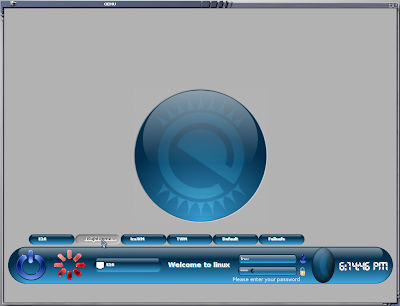


если хотите посмотреть на Enlightenment-DR17, то его надо выбрать вместо 16-го. по умолчанию у нас грузится E16-ый. стабильный, надёжный, быстрый, навороченный и вообще "красавец мужчина в самом расцвете сил". может выглядеть как... да как захотите, так и будет. мне захотелось вот так:


всё при нём. от крутейшего пейджера до систрея. кушать подано.

ежели Вы таки выбрали Enlightenment-DR17, то после логина (linux/soad или root/soad) будет вот эдакий "дефолт":


буквально за два щелчка мышкой можно сообразить что-нибудь повеселее:


после тычка в иконку "Фокса" Вас культурно спросят, хотите ли Вы установить Flash Player от славной компании Adobe:


на Ваше усмотрение. советую согласиться и попробовать, ибо "ломать - не строить", удалить установленный пакет можно всегда. кроме дефолтной темы оформления на диске есть 'detour', '23Oz', 'bluesteel' и 'Simplicity'. так примерно выглядит '23Oz':


а так - 'bluesteel':


пользуйте, люди добрые, да не обессудьте, коли чего не так. поправим, не сумлевайтесь!

удачи!

P.S. ежели осилили текст до строк сиих - далее можете не читать. сплошной копипасть да повторение для тех, кто в "великом и могучем" не силён...

☭☭☭☭☭☭☭☭☭☭☭☭☭☭☭☭☭☭☭☭☭☭☭☭☭☭☭☭☭☭☭☭☭☭☭☭☭☭☭☭☭☭☭☭☭
✵✵✵✵✵✵✵✵✵✵✵✵✵✵✵✵✵✵✵✵✵✵✵✵✵✵✵✵✵✵✵✵✵✵✵✵✵✵✵✵✵✵✵✵✵✵✵✵


time has passed by since the first 'release' of SOAD (SuSE On Active Diet) Linux LiveCD. just finished the injection of yet another portion of steroids into the iso image and happy to present you the modest results. comments are welcome.

to begin with allow me to show you some statistics (gathered by 'webalizer'):

1) the total downloaded size of livecd iso in July'08 was 2226994785Kb. it means we have approx 4000 downloaded copies

2) we had more than 11k hits to the download page

THANK YOU VERY MUCH! i didn't announce about this livecd here and there and have not a single idea why the counters show such scores. they're pretty high and unexpected.

each update of a LiveCD lead to the iso size increase, that's why i'd appreciate any idea which components could be safely deleted.

the following components was added:

*) man pages (amazing, there's still some persons who really read them, shocked...),
*) Tk (perl-Tk) for aria2-gui (it looks like... you know... but works great)
*) MPlayer+mplayerplug-in (you're welcome to visit apple.com and see the famous Apple ads. the brilliant explanation of good and evil are there). MPlayer is homebrewed. added live555 (rtsp/rtp streaming support) and all you wanted so long but was too shy to ask for... 127 audio & 257 video codecs under the hood. come and get some if you dare...
*) added Xchm with wxWidgets - sometimes it's handy to look through .chm file too.
*) Xmms is feautured as a VIP for the party! handle almost all audio you can get. from Monkey Audio till the dawn... dressed in a cool 'Almond', 'Ater' and other goldies. MPlayer also has some neat skins, don't worry...
*) 'less' package installed finally... (why i still don't hear your ovation...)
*) homebrewed E17 configs are gone. defaults here and there, but LiveCD has some treasures to be discovered. 'Detour', '23Oz', 'Bluesteel', 'Simplicity' and his majesty 'The Default Bling-Bling'. want some more?!
*) hope that known bugs with live-installer are fixed. (and hope is last to die)...
*) a couple of updates are installed, some mighty spells were cast, some artwork with a hammer took place - as usual, nothing is new under the sun...

ignition:


if you're enlightened enough and 'sax2' is capable successfully autoconfigure your video card, then 'Entrance' will greet you, Master...


choose wisely. you get exactly what you choose. E16 is a default WM here. it's rock solid, fast and furious. wanna E17? np, make you shot! but here's E16 in and out. it has all you need or even can dream about. pay some respect.


ok. you like E17. fine. login (linux/soad or root/soad) and grab the defaults:


a couple of mouse clicks could make some fancy transformation:


after you click on a FF icon the following dialog appear. it's all up to you. :


here comes '23Oz':


and the 'bluesteel':


all E17 themes has a matching ETK ones. 'etk_prefs' is a nice GUI tool to choose a ETK theme.

regards!

P.S. your comments are welcome :).

*/

четверг, 17 июля 2008 г.

Instruction for Enlightenment-LiveCD installation on harddisk and/or flash/USB_stick. How-to.

/*

This article was written when I failed to run OpenSUSE automated installers (both of them: "into the local directory" and "installer from LiveCD to the harddisk"). Now "SOAD Linux" could be easily installed to your drive using the standard YaST Installers (in GUI or in 'ncurses' mode). So, please consider this article as an example of steps we did in early 90-th installing Linux from the running PC of a friend (who had the INTERNET! connection on a 11200 modem).

Here is the instruction how to install the "Enlightenment LiveCD" to your hard drive or flash drive. This instruction is also valid for all LiveCD's which use root fs compressed as a single 'squashfs' file. If you wish to copy LiveCD to the flash drive then you may wish to keep 'squashfs' file with a root tree and just add a grub loader and proper 'initrd'. I didn't test the details of installation to the flash pen because I don't have 1Gb or more needed ones.

The idea of the "istallation" from LiveCD to any other media is quite simple. Prepare your destination drive, copy the content of 'squashfs' to the new root partition, generate proper 'initrd' and configure bootloader. The only thing here that is important is patience. Packages like 'grub' and 'mkinitrd' are added only to the last LiveCD versions, you can add them by hand (just compare 'list_of_iinstalled_packages' with your own) or grab the latest LiveCD iso image.

Here we go...

Almost all actions require root privileges, just open your terminal (Xterm, btw, do you like it's default settings? hope you do...) and become a 'root' (type 'su' and Passwd - 'soad').

1. Create a proper partitioning for the destination drive. Prepare at least separate partitions for swap and root. The rest you can manage later. Here's what I have right after system install from LiveCD to the 'Qemu' virtual drive:

256Mb for swap partition, 3.7Gb (the rest from 4Gb virtual disk) for root partition and root partition have 2.4Gb of space available (used only 1.2Gb). I like it and aware that some packages could be deleted from installed system to free even more space. Treat it as an answer to the rants of lusers that OpenSUSE is "too fat, too slow, to inflexible in configuration, etc".

Let's make an assumption that your destination drive is /dev/sda, where you have /dev/sda1 as swap and /dev/sda2 as root partition (at least). You can make it all via YaST Partitioner service.

2. Create three (3) temporary directories to be the 'mount points' for our exercise:

>mkdir /tmp/1
>mkdir /tmp/2
>mkdir /tmp/3

3. Mount our root partition, mount LiveCD which is still in your CD-ROM drive and run the box and mount compressed root fs of your LiveCD:

# root partition
>mount /dev/sda2 /tmp/1

# LiveCD itself
>mount /dev/sr0 /tmp/2 -o loop

# compressed 'squashfs' root fs of your LiveCD
>mount /tmp/2/suse-11.0-live-iso-read-only.i686-2.5.1 /tmp/3 -o loop -t squashfs

4. "Install" the whole system from LiveCD to the new root partition. As a source we're using the 'squashed' image mounted to the /tmp/3 . :

>cp -fra /tmp/3/* /tmp/1/

yep, that's how we all did it 10 years ago or so... good old "True Unix Way" :).

5. We need to copy /etc/fstab and adjust to our realm:

>cp /etc/fstab /tmp/1/etc/fstab

after adjustments I have something like this:

>cat /tmp/1/etc/fstab

devpts /dev/pts devpts mode=0620,gid=5 0 0
proc /proc proc defaults 0 0
sysfs /sys sysfs noauto 0 0
usbfs /proc/bus/usb usbfs noauto 0 0
debugfs /sys/kernel/debug debugfs noauto 0 0
#/dev/disk/by-id/scsi-SATA_QEMU_HARDDISK_QM00001-part1 swap swap defaults 0 0
#/dev/disk/by-id/scsi-SATA_QEMU_HARDDISK_QM00001-part2 / ext3 acl,user_xattr 1 1
/dev/sda1 swap swap defaults 0 0
/dev/sda2 / ext3 acl,user_xattr 1 1

Replaced the mount operation of swap and root from 'disk_by_id' to the good old 'dev' style. It's not the point if you'd just copy 'disk_id' to the target system (/dev/disk/*).

6. Now we need to generate a proper 'initrd' for our target system

> chroot /tmp/1/
> mkinitrd
> exit

Hint: we could generate 'initrd' withou 'chroot' operation and then just copy it to the destination ( cp /boot/initrd-2.6.25.5-1.1-default /tmp/1/boot/ ), but it's more safe to make it in chroot. Original LiveCD has a 'monster' initrd image you can look at:

> l /tmp/2/boot/i386/loader/initrd

You may experiment with this 'fat cat' or even create yours:

> mkinitrd -A

It's funny, you gonna like it!

7. And it's time to make our system bootable and adjust bootloader configs. Some kind of 'typing exercise' is here because default (automated) presets are not helpful.

> cp -r /boot/groob /tmp/1/boot/
> cp -r /boot/boot /tmp/1/boot/

Check our 'map' file (or create if none exist yet):

> cat /tmp/1/boot/grub/device.map

(hd0) /dev/sda
(fd0) /dev/fd0

Manual installation of 'grub' to the MBR of our destination disk (/dev/sda):

> grub

# yep, we've entered to the grub's command line mode
# the next command will install loader code to the MBR assuming that all configuration files are located in (/dev/sda2)/boot/grub/ directory.

grub> setup --stage2=/boot/grub/stage2 (hd0) (hd0,1)

8. Let's create a simple bootloader menu:

> cat /tmp/1/boot/grub/menu.lst

timeout 3

title SOAD
root (hd0,1)
kernel /boot/linuz
initrd /boot/initrd

9. Reboot to the new system and fix any errors (if any). Before you press 'reboot button' the following MIGHT be useful (but It's just an example of 'insurance' if I may say so):

> cp /dev/sd* /tmp/1/dev/
> cp /dev/md* /tmp/1/dev/
> cp /dev/sr* /tmp/1/dev/
> cp /dev/cd* /tmp/1/dev/
> cp /dev/md* /tmp/1/dev/
> cp /dev/ram* /tmp/1/dev/

When you update your kernel to the newer one (you'd BETTER do it ASAP) all required 'devices' (and a lot of other components) will be properly recreated.

10. After reboot to your new system remove/stop all services you don't really need and enable those you can't live without. Examples:

> chkconfig create_xconf off
> chkconfig entrance_force off
> chkconfig entrance on
> chkconfig entrance 35

Or you may leave 'entrance_force" - doesn't matter, it's just a crutch for LiveCD, and if you have generated /etc/X11/xorg.conf - stop 'create_xconf' or you gonna lose all custom modification because file will be created 'from scratch' every time you turn your system on.

P.S. If you wish to install on flash pen and keep 'squashed' root fs, then you need to 'google' for UNIONFS and implementation of grub+UNIONFS. I'd provide detailed 'how-to from LiveCD to the flash' if I had one suitable here :). Can only recommend to begin with this page if you wish to master your Live USB system:

Live_USB_stick

(only keep im mind that default patterns in 'config.xml' files... sucks! I bet you wish to have some 'packman' goodies and some more from your own... )

If you find any 'bug' in this small how-to - please, post a comment here. Thanks!

*/

вторник, 15 июля 2008 г.

Enlightenment LiveCD

/*

Поросёночку не спалось - и одним LiveCD стало больше (размерчик "исошки" пока равен 430Мб):

SOAD-LiveCD (first alpha release)

Прочесть краткое описание можно пройдя по ссылке в заголовке сей заметки. Господа и Дамы, буду зело признателен за любые отзывы, пожелания, предложения и т.п.!

Список установленных пакетов

Как только всё допилю - добавлю опцию по установке на хард (ежели кому оно буде надо). Зачем это всё было делать? Ответ одной строкой: шрифты; кодеки; нормальные репозитории; стабильное, быстрое и удобное рабочее окружение ("удобное" - эт imho).

*/